
Retrieval-Augmented-Generation-RAG-System
Requirement need:
- LLM: Llama‑2 7B
- LLM API: llama.cpp service
- Langchain
- Vector DB: ChromaDB
- Embedding: sentence-Transformers
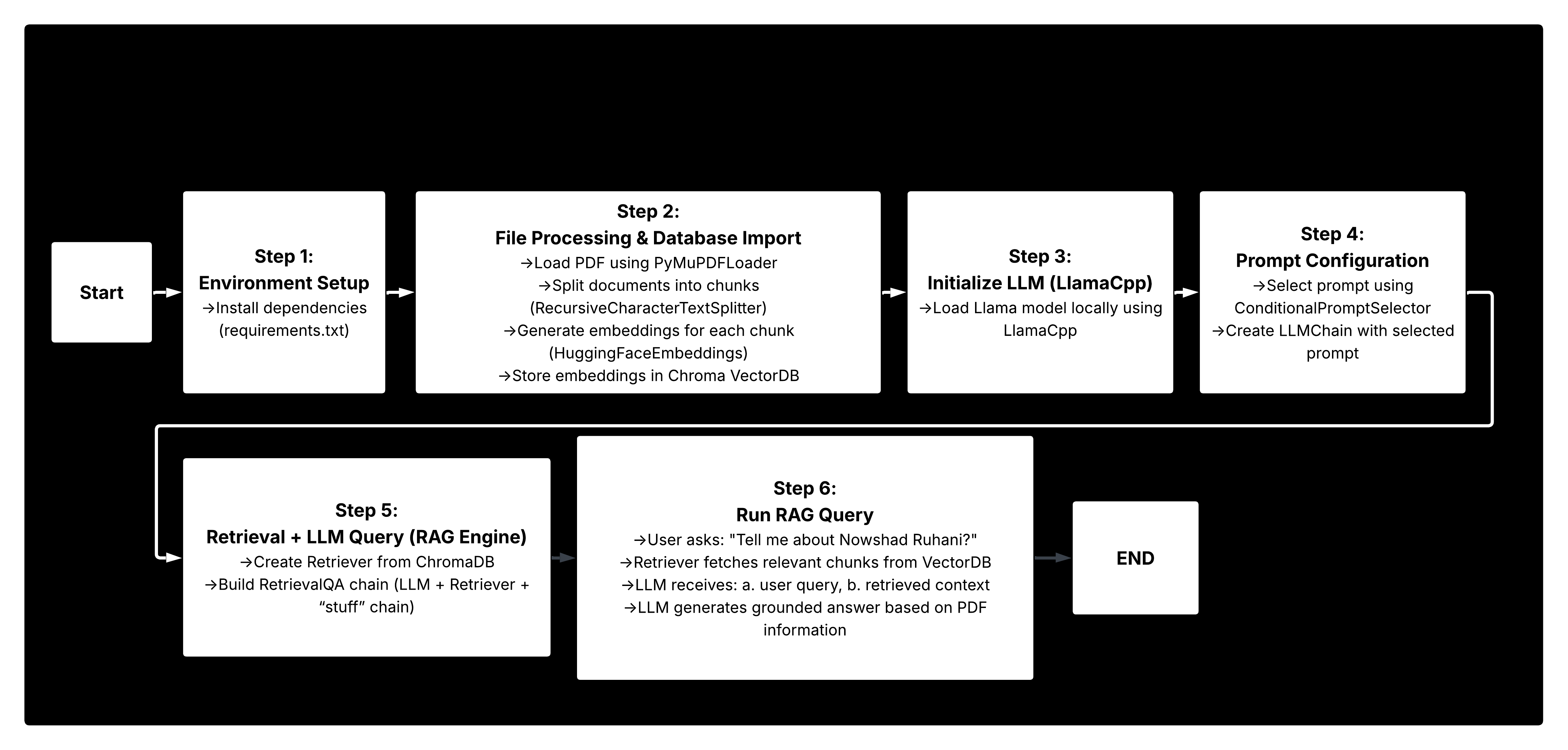
Rag Results After Retrieval:


LangChain serves as the backbone of this setup, providing a flexible framework for building applications powered by large language models. It acts as the connective layer, making it easy to integrate LLMs with external tools, data sources, and workflows. Because the project evolves quickly, its APIs and documentation change often, so implementations may require occasional updates. Below is the most straightforward way to configure the system using the current stable approach.
Step 1: Environment Setup
Set up your python environment. just need to install libraries based on requirements.txt file.
pip install -r requirements.txt
Step 2: File Processing and Database Import
We begin by processing external data and storing it in the vector database so it can be used later for knowledge‑based queries. This corresponds to the orange section of the architecture diagram—specifically steps 1. Text Splitting and 2. Embedding, where raw documents are broken into chunks and converted into vector representations for efficient retrieval.
a) Using Document Loaders
LangChain provides more than 50 built‑in document loaders, supporting formats such as Word, CSV, PDF, Google Drive files, and even YouTube transcripts. In this example, we use PyMuPDFLoader to read a résumé from a PDF file. Since this loader depends on the PyMuPDF library, make sure it is installed before using it.
print("Loading document...")
loader = PyMuPDFLoader("about-me.pdf")
documents = loader.load()
print(f"Loaded {len(documents)} documents.")
b) Using Text Splitter to Split Documents
Text splitters break large documents into smaller chunks so they fit within the LLM’s token limits. In this setup, we use either RecursiveCharacterTextSplitter or CharacterTextSplitter to perform the chunking. The key parameters are chunk_size, which defines the maximum number of characters per chunk, and chunk_overlap, which controls how many characters are shared between consecutive chunks to preserve context.
text_splitter = RecursiveCharacterTextSplitter(chunk_size=100, chunk_overlap=5)
all_splits = text_splitter.split_documents(documents)
print(f"Total chunks created: {len(all_splits)}")
c) Loading the Embedding Model
We use an embedding model to convert the text chunks from step (b) into numerical vector representations. These vectors allow the system to perform similarity search and retrieve relevant information efficiently. LangChain supports a wide range of embedding models, making it easy to choose one that fits your performance and accuracy needs.
persist_directory = 'db'
model_name = "sentence-transformers/all-MiniLM-L6-v2"
model_kwargs = {'device': 'cpu'}
embedding = HuggingFaceEmbeddings(model_name=model_name,
                                  model_kwargs=model_kwargs)
d) Importing the Embedding Results into VectorDB
We store the generated embeddings in a vector database, using Chroma as the backend. This allows the system to efficiently index and retrieve relevant document chunks during query time.
vectordb = Chroma.from_documents(documents=all_splits,
                                 embedding=embedding,
                                 persist_directory=persist_directory)
Step 3: Initiating the LLM Service
There are two main ways to initialize your LLM and connect it to LangChain: either by using LangChain’s built‑in LlamaCpp interface or by running the model as an external API service, such as through a llama.cpp server. Both approaches are shown here to illustrate the flexibility of integrating Llama‑based models into your workflow.
Using LangChain’s LlamaCpp
This approach is the more straightforward option, as it uses LangChain’s built‑in LlamaCpp interface to load the model directly and start the Llama runtime locally. It requires no external server setup, making it the quickest way to initialize and run the model within your application.
from langchain.callbacks.manager import CallbackManager
from langchain.callbacks.streaming_stdout import StreamingStdOutCallbackHandler
from langchain_community.llms import LlamaCpp

llm = LlamaCpp(
    model_path="/Users/nowshad/.cache/huggingface/hub/models--TheBloke--Llama-2-7B-Chat-GGUF/snapshots/191239b3e26b2882fb562ffccdd1cf0f65402adb/llama-2-7b-chat.Q2_K.gguf",
    n_gpu_layers=100,
    n_batch=512,
    n_ctx=2048,
    f16_kv=True,
    callback_manager=CallbackManager([StreamingStdOutCallbackHandler()]),
    verbose=True,
)
print("LLM initialized.")
Step 4: Setting Your Prompt
LLMs require different prompt formats, so we use ConditionalPromptSelector to automatically choose the appropriate prompt based on the model type. This ensures each model receives the structure it expects, improving consistency and preventing formatting issues during generation.
from langchain.chains import LLMChain
from langchain.chains.prompt_selector import ConditionalPromptSelector
from langchain.prompts import PromptTemplate


DEFAULT_LLAMA_SEARCH_PROMPT = PromptTemplate(
    input_variables=["question"],
    template="""<<SYS>>You are an assistant that generates improved Google search queries.<</SYS>>
    [INST] Create THREE alternative Google search queries related to the user’s question.
    Return them as a numbered list, and ensure each query ends with a question mark.
    Question:{question}[/INST]"""
)

DEFAULT_SEARCH_PROMPT = PromptTemplate(
    input_variables=["question"],
    template="""You are an assistant that generates improved Google search queries.
        Create THREE alternative search queries related to the user’s question.
        Return them as a numbered list, and ensure each query ends with a question mark.
        Question: {question}"""
)

QUESTION_PROMPT_SELECTOR = ConditionalPromptSelector(
    default_prompt=DEFAULT_SEARCH_PROMPT,
    conditionals=[(lambda llm: isinstance(llm, LlamaCpp), DEFAULT_LLAMA_SEARCH_PROMPT)],
)
prompt = QUESTION_PROMPT_SELECTOR.get_prompt(llm)

"""
Create an LLMChain that connects the selected prompt with the loaded Llama model.
Pass a question into the chain to generate an answer using the LLM.
Invoke the chain with the input dictionary and return the model’s response.
"""
llm_chain = LLMChain(prompt=prompt, llm=llm)
question = "Tell me about Nowshad's experience in Huawei?"
llm_chain.invoke({"question": question})
Step 5: Text Retrieval + Query LLM
We’ve now stored the PDF content in the vector database and initialized the LLM. The next step is to connect the full RAG pipeline. The process works as follows:
- The user submits a question.
- Relevant text is retrieved from the vector database.
- The retrieved context is combined with the user’s query and sent to the LLM.
- The LLM generates an answer grounded in the retrieved information.
To enable this, we first create a Retriever that returns the most relevant document chunks for any incoming query. We then integrate the Retriever, the user’s question, and the LLM using RetrievalQA to form a complete retrieval‑augmented generation workflow.
retriever = vectordb.as_retriever()
qa = RetrievalQA.from_chain_type(
    llm=llm,
    chain_type="stuff",
    retriever=retriever,
    verbose=True
)
Step 6: Using Your RAG
We now have the full RAG pipeline connected, so we can run real queries against the stored data. As an example, let’s ask the system about my background—Nowshad Ruhani—based on the information extracted from the PDF. The retriever will pull the most relevant chunks from the vector database, and the LLM will generate a grounded response using that context.
query = "Tell me about Nowshad Ruhani?"
qa.invoke(query)