
RAG-application-built-with-AI-assistance-(Claude-Vibe-coding)
Build an agentic RAG application from scratch by collaborating with Claude Code.
Workflow:
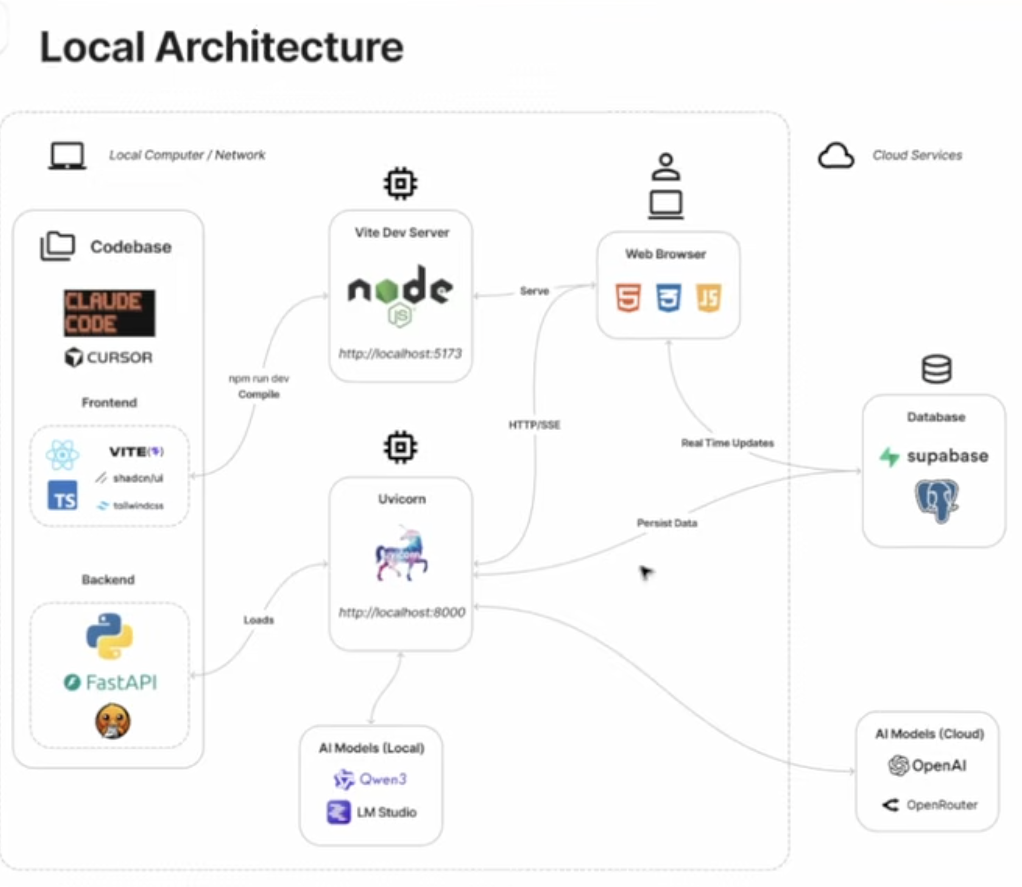
What Built
- Chat interface with threaded conversations, streaming, tool calls, and subagent reasoning
- Document ingestion with drag-and-drop upload and processing status
- Full RAG pipeline: chunking, embedding, hybrid search, reranking
- Agentic patterns: text-to-SQL, web search, subagents with isolated context
Tech Stack
| Layer | Tech |
|---|---|
| Frontend | React, TypeScript, Tailwind, shadcn-style UI, Vite |
| Backend | Python, FastAPI |
| Database | Supabase (Postgres + pgvector + Auth + Storage) |
| Doc Processing | Docling |
| AI Models | Local (LM Studio) or Cloud (OpenAI, OpenRouter) |
| Observability | LangSmith |
Module 1 — Local development
Implemented in this repo: Supabase Auth (browser), FastAPI JWT verification, Postgres conversations table with RLS, OpenAI Responses API streaming + previous_response_id, file_search via one vector store per conversation, LangSmith tracing on the OpenAI stream call, minimal React chat UI with SSE + file attach.
Prerequisites
- Supabase project with Email auth enabled (password and/or magic link).
- Run the SQL migration: paste
supabase/migrations/20260502000000_conversations.sqlinto the Supabase SQL editor (or use the Supabase CLI if you use it locally). - OpenAI API key with Responses + vector stores / file search access.
- LangSmith API key and project (set
LANGSMITH_TRACING=true).
Environment
Copy .env.example to backend/.env and frontend/.env (same keys split by prefix):
| Variables | Where |
|---|---|
VITE_SUPABASE_URL, VITE_SUPABASE_ANON_KEY, VITE_API_BASE_URL | frontend/.env |
SUPABASE_*, OPENAI_*, FRONTEND_ORIGIN, LANGSMITH_* | backend/.env |
JWT verification: backend uses HS256 with SUPABASE_JWT_SECRET from Supabase → Settings → API → JWT Secret (JWT Signing Keys → legacy secret). The expected issuer is {SUPABASE_URL}/auth/v1 and audience authenticated. If verification fails after rotating keys, confirm those values match Supabase’s docs for your project.
CORS: FRONTEND_ORIGIN must match the URL where Vite runs (default http://127.0.0.1:5173).
Commands
# Backend (from backend/)
python -m venv .venv && source .venv/bin/activate
pip install -r requirements.txt
uvicorn app.main:app --reload --host 127.0.0.1 --port 8000

# Frontend (from frontend/)
npm install
npm run dev
Smoke checks:
curl -s http://127.0.0.1:8000/health→{"ok":true}- Sign in on the UI → New chat → send a message → streamed assistant reply
- Optional: Attach file (
.txt,.pdf,.md,.csv,.html), then ask something grounded in that file - LangSmith project shows a trace for
openai_responses_create_stream
When everything above works, mark Module 1 complete in PROGRESS.md.
The 8 Modules
- App Shell — Auth, chat UI, managed RAG with OpenAI Responses API
- BYO Retrieval + Memory — Ingestion, pgvector, switch to generic completions API
- Record Manager — Content hashing, deduplication
- Metadata Extraction — LLM-extracted metadata, filtered retrieval
- Multi-Format Support — PDF, DOCX, HTML, Markdown via Docling
- Hybrid Search & Reranking — Keyword + vector search, RRF, reranking
- Additional Tools — Text-to-SQL, web search fallback
- Subagents — Isolated context, document analysis delegation
Getting Started (course)
- Clone this repo
- Install Claude Code
- Open in your IDE (Cursor, VS Code, etc.)
- Run
claudein the terminal - Use the
/onboardcommand to get started
Docs
- PRD.md — What to build (the 8 modules in detail)
- CLAUDE.md — Context for Claude Code
- PROGRESS.md — Track your build progress